
1- Hour Presentations
What’s New With Apple Accessibility
WEDNESDAY, 8:00 am – 9:00 am | BLOOMINGTON
&
THURSDAY, 10:00 am – 11:O0 pm | ATRIUM 6
Janette Barrios from Apple’s Global Accessibility Policy & Initiatives team will provide an overview of Apple’s newest accessibility features and how they address a wide range of user needs. Learn about how with the power of Apple Intelligence, features like VoiceOver, Magnifier, Voice Control, and Accessibility Reader gain new capabilities. Janette will share more about new, intuitive options for input, exploration, and personalization through features like generated captions for non-captioned media and how Apple Vision Pro users can now control compatible wheelchairs with their eyes. Attendees will also be guided to resources and demos for hands-on exploration.
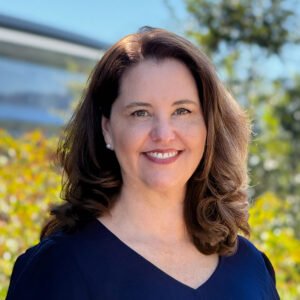
Janette Barrios is a senior manager for Accessibility Policy & Initiatives at Apple. With 21 years at the company, she works on raising awareness of Apple’s accessibility innovation and initiatives, including technology such as the VoiceOver screenreader for people who are blind, assistive hearing features, accessibility in education, enterprise and government, as well as other initiatives that support disability communities worldwide and Apple’s culture of inclusion.
APPLE EXPERIENCE ROOM
WEDNESDAY: 9:00 am – 5:00 pm
VERANDAS 3, 5, 7
Visit the Apple Accessibility Experience Room to connect with Janette Barrios (Accessibility Policy & Initiatives at Apple), Apple Education leaders and Engineers.
Join a drop-in session, complete your Apple Accessibility Bingo card by learning about Apple’s built-in accessibility features across Speech, Cognitive, Mobility, Hearing, and Vision.
15-Minute Drop-In Sessions Featuring Apple’s Built-In Accessibility Features
| 11:00 am – 11:15 am | 12:45 pm – 1:00 pm | 2:45 pm – 3:00 pm | 4:15 pm – 4:30 pm | 4:45 pm – 5:00 pm |
| Cognitive | Mobility | Hearing | Vision | Speech |
| Practical tips for using iPad to support cognitive needs. | Customize and control Apple devices using voice, eyes, head, and more. | Maximizing Hearing features across the Apple ecosystem. | Make the most of VoiceOver and Magnifier, with Apple Intelligence. | Communicate your way using Personal Voice and Live Speech. |
USER FEEDBACK WITH APPLE
THURSDAY: 9:00 am – 4:00 pm
ATRIUM 8
Meet with members of the Apple Accessibility team to give feedback on specific features, and share your personal insights from your lived experience or working with people with disabilities.
Book an appointment now to ensure availability!
APPLE EXPERIENCE ROOM
WEDNESDAY: 9:00 am – 5:00 pm
VERANDAS 3, 5, 7
Visit the Apple Accessibility Experience Room to connect with Janette Barrios (Accessibility Policy & Initiatives at Apple), Apple Education leaders and Engineers.
Join a drop-in session, complete your Apple Accessibility Bingo card by learning about Apple’s built-in accessibility features across Speech, Cognitive, Mobility, Hearing, and Vision.
15-Minute Drop-In Sessions Featuring Apple’s Built-In Accessibility Features
| 11:00 am – 11:15 am | 12:45 pm – 1:00 pm | 2:45 pm – 3:00 pm | 4:15 pm – 4:30 pm | 4:45 pm – 5:00 pm |
| Cognitive | Mobility | Hearing | Vision | Speech |
| Practical tips for using iPad to support cognitive needs. | Customize and control Apple devices using voice, eyes, head, and more. | Maximizing Hearing features across the Apple ecosystem. | Make the most of VoiceOver and Magnifier, with Apple Intelligence. | Communicate your way using Personal Voice and Live Speech. |
USER FEEDBACK WITH APPLE
THURSDAY: 9:00 am – 4:00 pm
ATRIUM 8
Meet with members of the Apple Accessibility team to give feedback on specific features, and share your personal insights from your lived experience or working with people with disabilities.
Book an appointment now to ensure availability!